Why VR Is Quietly Rewriting the Rules of Training and Education

Picture a surgical resident practicing a high-risk procedure for the tenth time - without a single real patient on the table. Or a warehouse trainee learning to operate heavy machinery in a setting where a mistake costs nothing but a quick reset. This isn’t science fiction anymore. It’s the everyday reality being built through VR development for training and education. 

For decades, learning meant sitting still, staring at a slide, and hoping the information stuck. Today, VR education flips that script entirely. Instead of reading about a concept, learners step inside it. And the results speak for themselves. 

Learning by Doing - Finally, At Scale

The oldest truth in education is also the simplest: people learn best by doing. The problem has always been that “doing” is expensive, risky, or just plain impossible. You can’t send a class of medical students into a live operating room. You can’t let every pilot crash a plane to learn from it.

This is exactly the gap that vr education software fills. Immersive simulations let learners practice complex, high-stakes skills in a safe, repeatable environment. They can fail, reset, and try again - as many times as it takes. Research consistently shows that immersive, hands-on learning dramatically improves both knowledge retention and confidence compared to passive methods. 

The magic word here is immersion. When your brain believes it’s actually there, it remembers. That’s the entire foundation of modern vr educational apps. 

Where VR and AR Are Making the Biggest Impact

Healthcare and medical training. Surgeons rehearse procedures, nurses practice patient care scenarios, and students explore 3D anatomy they can walk around and pull apart. Mistakes become lessons, not liabilities. 
Corporate and workplace training. From safety drills to soft-skills practice like difficult conversations, companies are using vr educational apps to onboard employees faster and far more effectively than any video module ever could.

K-12 and higher education. Imagine a history lesson where students walk through ancient Rome, or a biology class where they shrink down and travel through the human bloodstream. This is where vr education turns abstract curriculum into unforgettable experience. 

Technical and industrial skills. Welding, machinery operation, equipment repair - high-cost, high-risk skills become accessible to anyone with a headset. 

Traditional Training vs. VR Education at a Glance

Here’s how immersive learning stacks up against the old way of doing things:

FactorTraditional Training VR Education Software
Knowledge retentionLower (passive learning)Significantly higher (immersive, hands-on)
Risk during practiceHigh for technical/medical skillsZero - safe, repeatable environment
Cost per learner (at scale)Rises with equipment & travelDrops sharply after initial build
ConsistencyVaries by instructorIdentical experience every time
Performance trackingManual, limitedBuilt-in, data-driven
AccessibilityLocation-dependentAnywhere with a headset

Why Companies Are Investing in VR Education Software Now

A few years ago, the price of entry kept VR development locked away in well-funded labs. That barrier has collapsed. Headsets are cheaper, more powerful, and far more comfortable. Development tools have matured. And crucially, the ROI is now easy to prove. 

Consider the math: traditional training often requires physical equipment, travel, instructors, and downtime. Quality vr education software can deliver the same training - or better - repeatedly, anywhere in the world, with consistent results every single time. One well-built simulation can train thousands. 

The blend of vr ar education also lets organizations meet learners where they are. Augmented reality overlays digital guidance onto the real world, while virtual reality creates fully controlled environments for deep, focused practice. Together, they cover the full spectrum of how people learn. 

Key Benefits at a Glance

A quick rundown of why organizations are choosing vr educational apps:

  • Safe practice - learners fail and retry without real-world consequences.
  • Faster onboarding - immersive simulations cut training time dramatically.
  • Higher engagement - vr ar education keeps attention far better than slides or video.
  • Scalable ROI - one strong vr education software build can train thousands.
  • Measurable results - performance data proves that learning actually happens.
  • Flexible deployment - combine AR for on-the-job support with VR for deep, focused practice.

What Makes a Great VR Educational App?

Not all immersive learning is created equal. The difference between a gimmick and a genuinely transformative tool comes down to a few things: 

Real interactivity, not just 360° video. The best vr educational apps let learners act, not just observe. 

Meaningful feedback. Great vr education software tells learners what they did right, what went wrong, and how to improve - instantly. 

Measurable outcomes. Modern platforms track performance data, so trainers can prove that learning is actually happening. 

Comfort and accessibility. If a headset makes people dizzy or the interface is confusing, even the best content fails. Thoughtful VR development always puts the user experience first. 

The Future Is Immersive

We’re standing at a genuine turning point. As hardware gets lighter, content gets smarter, and AI starts personalizing each learner’s journey, vr education is moving from “nice-to-have” to “competitive necessity.” Organizations that embrace vr ar education now are building a workforce - and a generation of students - that learns faster, remembers more, and performs better under pressure.

The classroom of the future won’t be a room at all. It’ll be anywhere you put on a headset.

If you’re exploring VR development for your training or education program, the question is no longer whether immersive learning works. The evidence is in. The real question is how quickly you’ll put vr educational apps and vr education software to work for the people who matter most - your learners. 

Frequently Asked Questions

What is VR education software used for? 

VR education software is used to create immersive, interactive training simulations across healthcare, corporate, industrial, and academic settings. It lets learners practice real skills in a safe virtual environment, improving retention and confidence far beyond traditional methods. 

Are VR educational apps expensive to develop? 

The cost of VR development has dropped significantly in recent years thanks to cheaper hardware and mature development tools. While there’s an upfront investment, well-built vr educational apps deliver strong long-term ROI by reducing equipment, travel, and instructor costs while training learners at scale. 

What’s the difference between VR and AR in education? 

In vr ar education, virtual reality (VR) creates fully immersive, controlled environments for deep practice, while augmented reality (AR) overlays digital guidance onto the real world - ideal for on-the-job support. Together they cover the full range of how people learn. 

Does VR education actually improve learning outcomes? 

Yes. Research consistently shows that immersive, hands-on learning through vr education boosts knowledge retention and learner confidence compared to passive methods like reading or watching videos. 

CRM Development in 2026 Features That Actually Matter

Customer expectations have outpaced legacy systems. Here’s what separates a modern, intelligent CRM platform from the tools that are already holding businesses back.
 
Building or upgrading a CRM in 2026 means far more than tracking contacts. Today’s CRM development software has evolved into a full business operating layer - combining automation, AI, analytics, and omnichannel communication in one cohesive platform. Companies that invest in the right CRM features now will compound those advantages for years to come. 

AI-Powered Automation

Artificial intelligence has moved from a “nice-to-have” to the operational core of serious CRM software features. The platforms that are winning in 2026 use AI to augment every stage of the customer journey - not just the back-end.

The most impactful AI capabilities include smart lead scoring, predictive analytics, AI-generated sales recommendations, and automated behavioral analysis. These features allow sales and support teams to focus on high-priority work rather than manual data entry.

  • 01
    Smart lead scoring 

    Rank leads dynamically based on real engagement signals. 

  • 02
    Predictive analytics

    Surface risks and opportunities before they become obvious.

  • 03
    Auto-responses

    Contextual, AI-drafted replies that don’t sound robotic.

  • 04
    Behavior analysis

    Understand how customers interact with every touchpoint.

Advanced Workflow Automation

Automation is still the most-requested category in CRM development software evaluations. Businesses want to cut operational costs and remove manual steps from every repeatable process.

Modern workflow engines should support task creation and assignment, follow-up reminders, automated onboarding sequences, multi-step approval chains, pipeline-triggered actions, and scheduled reporting - all without requiring a developer to make changes.

The best automation doesn’t feel like automation - it feels like a well-organized team.

Omnichannel Communication

Customers move fluidly between channels. A conversation that starts on WhatsApp shouldn’t feel disconnected when it continues over email. A unified communication center is no longer optional for competitive CRM features.

Custom Dashboards & Analytics

Data-driven CRM strategy requires dashboards that teams actually use. The best CRM software features in this area combine real-time reporting, KPI tracking, revenue forecasting, sales funnel visualization, and customer lifetime value analysis - all customizable to each team’s specific needs.

When teams can see bottlenecks clearly, they fix them faster. That’s the compounding value of investing in analytics during CRM development, not as an afterthought.

Cloud-Based Accessibility

With hybrid work now the default, cloud infrastructure is table stakes for any modern CRM development software project. This means secure remote access from any device, real-time data synchronization, automatic backups, and on-demand scalability - all without a dedicated IT team managing servers.

Security & Compliance

CRM systems hold some of the most sensitive data a business touches. Role-based access control, two-factor authentication, end-to-end encryption, GDPR compliance, and detailed audit logs aren’t just checkboxes - they’re the foundation of customer trust.

For businesses operating across regions, compliance with local data protection regulations (GDPR, CCPA, and equivalents) must be built into the architecture from day one - not patched in later.

API-First Architecture

No CRM operates in isolation. An API-first approach allows your platform to connect cleanly to ERP systems, marketing automation tools, accounting software, e-commerce platforms, helpdesk solutions, and BI tools - both today and as your stack evolves.

The best CRM platforms don’t try to replace every tool. They integrate with the tools your teams already depend on.

Mobile CRM Experience

Field sales teams, remote workers, and executives need full CRM capability on mobile - not a stripped-down afterthought. A proper mobile CRM software features set includes responsive design, offline access, push notifications, mobile dashboards, and quick customer update flows.

Personalization & Scalability

The CRM you build today should still fit your business in five years. Modular architecture, custom user roles, flexible data structures, white-label options, and multi-language support all contribute to long-term platform value.

Rigid off-the-shelf solutions force companies to adapt to the software. Well-architected CRM development software adapts to the company.

Guide to Enabling iOS Push Notifications with Images

Imagine enabling your users to receive and send rich iOS push notifications (image, stickers, emojis, or gifs) in .NET MAUI. While text push notifications are old news, enabling notification service extension in iOS is another deal. Overcoming iOS and Firebase limitations for images requires several steps, and today we are going to guide you through them.

It’s commonplace to use Firebase cloud messaging to mobile devices in .NET MAUI projects. While integrating Firebase push notifications is straightforward with the right library, attaching images like stickers or emojis to such notifications requires additional steps, especially for iOS. On Android, image notifications work seamlessly out of the box, but iOS demands some extra configuration to ensure images display correctly.

iOS and Firebase Limitations for Images

To display an image in a notification on iOS, Firebase must download the image before the notification is shown. This process is time-sensitive, with a maximum of 30 seconds to complete. To ensure success, adhere to the following restrictions:

  • Image size: Keep images under 300 KB.
  • URL requirements: Use a direct HTTPS link to the image, avoiding redirects.
  • Supported formats: Use .jpg, .jpeg, or .png. (Feel free to try other formats like .gif)

Implementing the Notification Service Extension for iOS

To handle images in iOS notifications, you need a Notification Service Extension. This extension intercepts the notification before it’s displayed, allowing you to process the payload and attach the image using Firebase’s PopulateNotificationContent method. Let’s set it up step by step, following Firebase and iOS guidelines.

Step 1: Create the Notification Service Extension

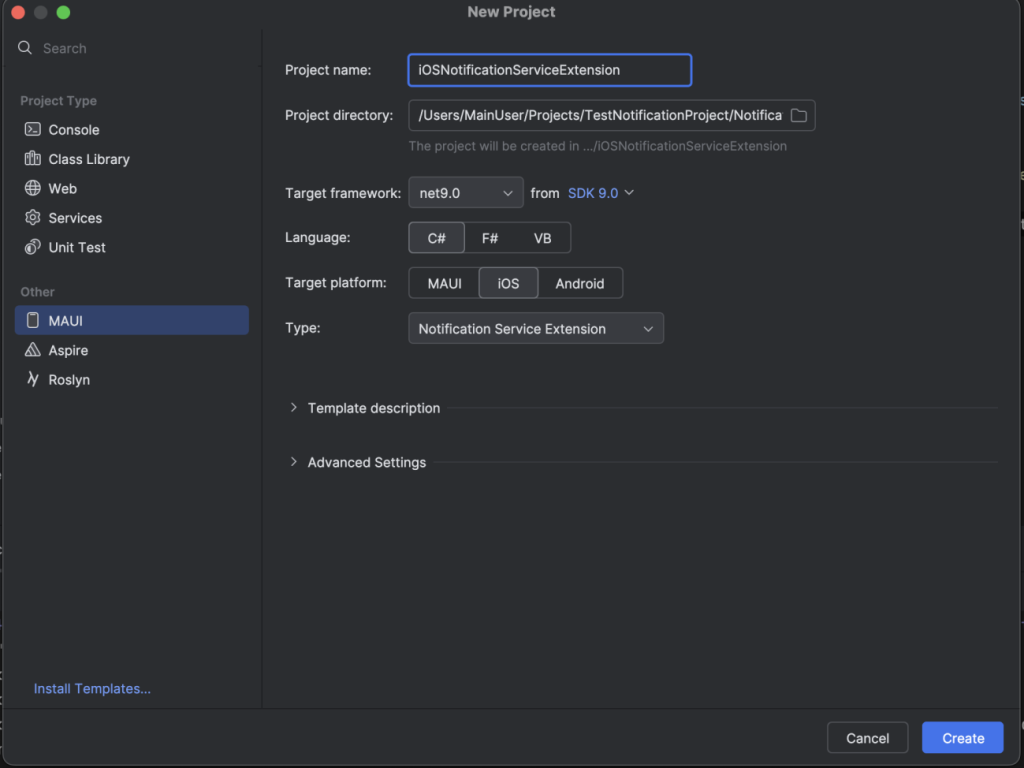
Start by adding a new project to your MAUI solution:

  • In Rider, right-click your solution and select Add -> New Project.
  • Choose the Notification Service Extension template from the MAUI templates list.

After creating the project, your new Notification Service Extension project should include three critical files:

  • .csproj
  • Info.plist
  • NotificationServiceClass.cs

Each file requires specific changes to enable image notifications.

Step 2: Configure the .csproj File

The .csproj file needs adjustments to include the Firebase library for downloading and attaching images. Ensure the OutputType is set to Library for proper compilation. Here’s how it should look:

<Project Sdk="Microsoft.NET.Sdk">
    <PropertyGroup>
        <TargetFramework>net9.0-ios</TargetFramework>
        <Nullable>enable</Nullable>
        <ImplicitUsings>true</ImplicitUsings>
        <SupportedOSPlatformVersion>14.2</SupportedOSPlatformVersion>
        <IsAppExtension>True</IsAppExtension>
        <OutputType>Library</OutputType>
        <IsWatchExtension>False</IsWatchExtension>
        <MtouchEnableBitcode>false</MtouchEnableBitcode>
    </PropertyGroup>
 
    <ItemGroup>
        <CustomEntitlements 
          Include="aps-environment" 
          Type="String" 
          Value="development" 
          Condition="'$(Configuration)' != 'Release'"/>
        <CustomEntitlements 
          Include="aps-environment" 
          Type="String" 
          Value="production" 
          Condition="'$(Configuration)' == 'Release'"/>
    </ItemGroup>   
 
    <ItemGroup>
        <PackageReference 
          Include="Plugin.Firebase.CloudMessaging" Version="3.1.2" />
    </ItemGroup>
 
</Project>

Add the Plugin.Firebase.CloudMessaging package to handle image downloading. This package is essential for processing notification payloads with images.

Step 3: Update the Info.plist File

The Info.plist file defines the extension’s configuration. You need to set two key properties:

  • MinimumOSVersion: Match the minimum OS version of your main MAUI project.
  • CFBundleIdentifier: Use the format {your app bundle ID}.{appname}serviceextension.
    For example, if your app’s bundle ID is com.devsx.imagenotificationsapp, the extension’s bundle ID should be com.devsx.imagenotificationsapp.imagenotificationsappserviceextension.

Here’s the updated Info.plist:

<?xml version="1.0" encoding="UTF-8"?>
<!DOCTYPE plist PUBLIC "-//Apple//DTD PLIST 1.0//EN" "http://www.apple.com/DTDs/PropertyList-1.0.dtd">
<plist version="1.0">
<dict>
    <key>CFBundleDisplayName</key>
    <string>NotificationServiceExtension</string>
    <key>CFBundleName</key>
    <string>NotificationServiceExtension</string>
    <key>CFBundlePackageType</key>
    <string>XPC!</string>
    <key>CFBundleShortVersionString</key>
    <string>1.0</string>
    <key>CFBundleVersion</key>
    <string>1.0</string>
    <key>MinimumOSVersion</key>
    <string>14.2</string>
    <key>CFBundleIdentifier</key>
    <string>com.yourappbundleid.appnameserviceextension</string>
    <key>NSExtension</key>
    <dict>
        <key>NSExtensionPointIdentifier</key>
        <string>com.apple.usernotifications.service</string>
        <key>NSExtensionPrincipalClass</key>
        <string>NotificationService</string>
    </dict>
</dict>
</plist>

Step 4: Modify the NotificationServiceClass.cs File

The NotificationServiceClass.cs file contains the core logic for processing notifications. The template generates most of the necessary code, but you need to add a Firebase method to handle the image. Replace the default base.DidReceiveNotificationRequest(request, contentHandler) call with MessagingExtensionHelper.PopulateNotificationContent to attach the image.

Here’s the updated file:

using ObjCRuntime;
using UserNotifications;
using Firebase.CloudMessaging;
 
namespace NotificationServiceExtension
{
    [Register("NotificationService")]
    public class NotificationService : UNNotificationServiceExtension
    {
        private UNMutableNotificationContent? _bestAttemptContent;
        private Action<UNNotificationContent> _contentHandler;
         
        protected NotificationService(NativeHandle handle) : base(handle)
        {
        }
 
        public override void DidReceiveNotificationRequest(UNNotificationRequest request, Action<UNNotificationContent> contentHandler)
        {
            _contentHandler = contentHandler;
            _bestAttemptContent = (UNMutableNotificationContent)request.Content.MutableCopy();
 
            new MessagingExtensionHelper().PopulateNotificationContent(_bestAttemptContent, _contentHandler);
        }
 
        public override void TimeWillExpire()
        {
            if (_bestAttemptContent != null)
            {
                _contentHandler?.Invoke(_bestAttemptContent);
            }
        }
    }
}

This modification ensures the Apple push notifications service apps process the image payload correctly.

Step 5: Register the Bundle ID and Provisioning Profile

To finalize the Notification Service Extension:

  • Register the new bundle ID (e.g., com.devsx.imagenotifications.imagenotificationsappserviceextension) in the Apple Developer Portal under Identifiers.
  • Generate a provisioning profile for the new bundle ID and select it in your project settings.

Step 6: Update the Main MAUI Project

In your main MAUI project, add a reference to the Notification Service Extension project in the .csproj file:

<ItemGroup>
    <ProjectReference 
       Include="..\NotificationServiceExtension\NotificationServiceExtension.csproj">
        <IsAppExtension>true</IsAppExtension>
        <IsWatchApp>false</IsWatchApp>
    </ProjectReference>
</ItemGroup>

This links the extension to your iOS push notifications app, enabling it to handle image notifications.

That’s it! Now send a new notification using Firebase Console or API and provide a link to your fabulous image. Enjoy!

Conclusions

This 6-step guide shows you how to add images to Firebase push notifications in iOS apps. It is straightforward and enables you to fix Firebase image not showing in iOS push notifications. Should you have any questions or encounter any challenges - we will be happy to answer them in the comments.

More great guides are coming up!